
Addresses
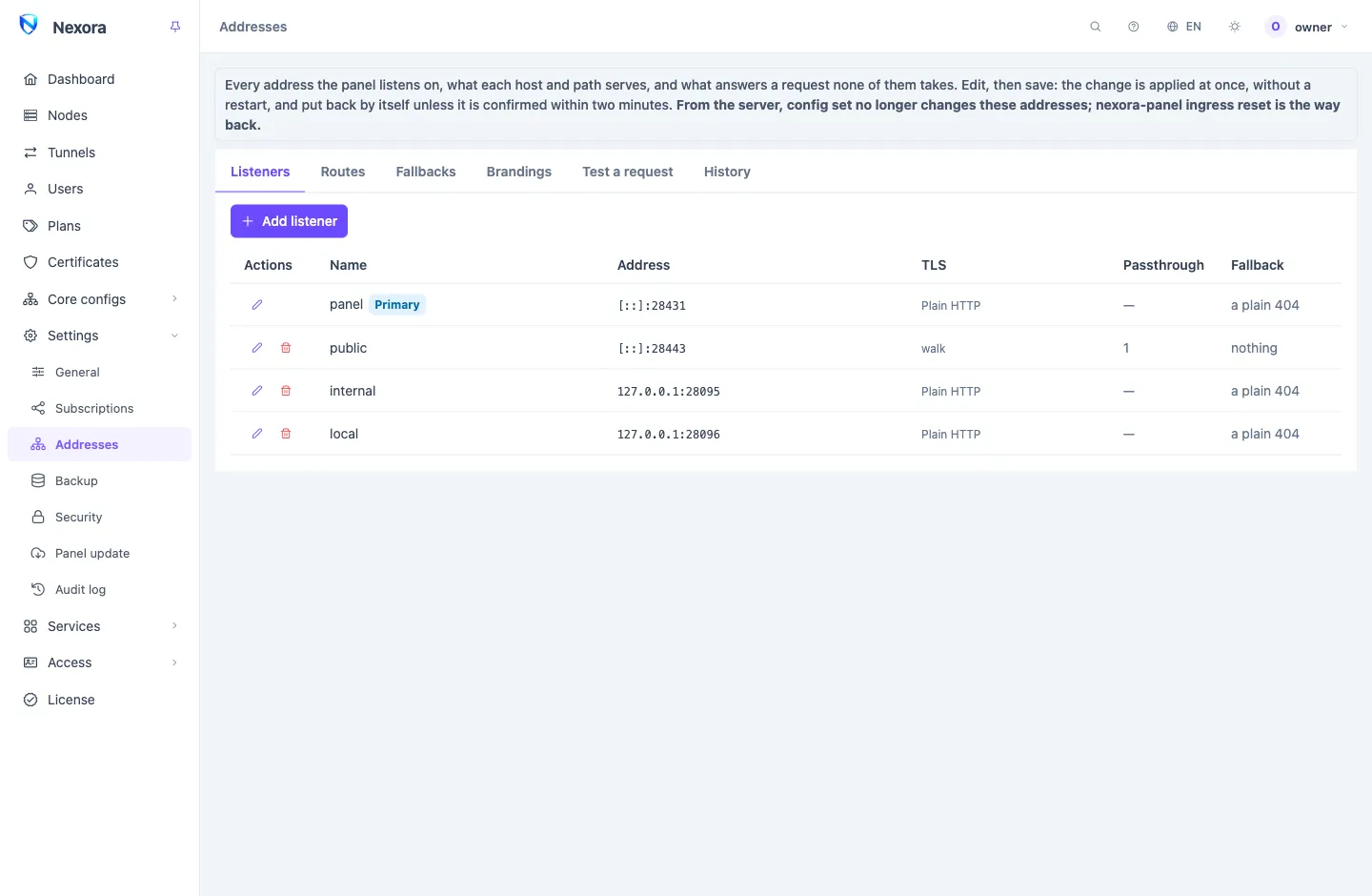
Settings → Addresses decides where the Panel can be reached and what it serves there: the admin panel, subscriptions, the API, a web site, another program, or a fixed answer. Only the main admin opens it. A change is applied at once, without a restart, and is put back by itself unless it is confirmed within two minutes.
The first address
The primary listener is the address the panel was installed on, and it always stays:
- It can be edited, its port, address and TLS included, but not removed, switched off or replaced by another listener.
- It always carries a Panel route and serves subscriptions, on a Subscriptions route or with Subscriptions on the panel route.
- Those two routes are marked Main. Their hosts, path prefix and options can be edited, but they cannot be deleted, given another service, bound to an account or taken off the primary listener.
- The setup wizard writes it. While the panel has this one address,
nx-panel config getandconfig setread and write it on the server, andnx-panel ingress resetrebuilds it (Command line). - In Docker its port is fixed by the compose file.
A change on this page applies at once. A change from the server's command line applies at the panel's next start.
How a request is answered
- A listener accepts the connection on its port, with its own TLS.
- The routes on that listener are tried in order. The first whose hosts and path prefix match, and whose service takes the path, answers.
- A request no route takes gets a fallback: the route's, else the listener's, else a plain "not found".
A fallback answers only what the panel refuses. The panel's own errors, such as a wrong password or an API "not found", are never replaced.
Listeners
A listener is one port the panel binds. The primary listener is the one the panel always starts on: it is always on, and in Docker its address is fixed by the compose file.
| Field | What it does |
|---|---|
| Listen address | An IP address of this server; empty listens on every address, IPv4 and IPv6. |
| Port | The port. On the primary listener, empty keeps the port the panel was started with. |
| TLS | Plain HTTP, A certificate from the store (from Certificates) or Certificate files on disk. |
| More certificates | Further certificates from the store. A client asking for a name one of them carries gets that one; anything else gets the listener's own. |
| Refuse unknown names | A TLS handshake asking for a name no certificate here carries is refused. Opening the panel by its IP still works when the certificate carries that IP. |
| Host must match the handshake | A request whose host name differs from the name its TLS handshake asked for gets the fallback. |
| Trusted proxies | Addresses and CIDRs whose X-Forwarded-For this listener believes. The primary listener's list is the one on Security. |
| Fallback | What answers a request no route on this listener takes. |
| Passthrough | Host names whose TLS connections are handed, untouched, to another host:port (below). |
A listener that cannot bind its port, or whose certificate does not load, shows Not serving with the reason, and the others keep serving. A TLS listener whose certificate does not load is never served as plain HTTP instead. The primary listener is the exception, so that you can still reach the panel: it falls back to plain HTTP and says so.
The panel answers ACME HTTP-01 and TLS-ALPN-01 challenges on its own listeners. A panel on ports 80 and 443 can still obtain certificates by those challenges; see Certificates.
Passthrough
A passthrough row sends a TLS connection for one host name to another program before the panel reads anything of it. The program terminates TLS with its own certificate. Use it to share port 443 with something that must see its own handshake, such as an inbound on a node running on the same server.
The program sees the panel's address as the client's. No PROXY protocol is sent, so per-client address limits in that program do not work through it.
Routes
Each route has a name, the listeners it is on, and three things that decide which requests it matches:
- Hosts: names or addresses, without a port.
*.example.commatches one label under it. Empty matches every host. - Except hosts: names it never answers, for a route on every host.
- Path prefix: empty, or
/name. The prefix is removed before the service sees the path.
Routes are tried from the top; Move up and Move down change the order.
What a route serves
| Serves | Takes | What it is for |
|---|---|---|
| Panel | everything | The admin panel and its own API, plus the parts switched on: Subscriptions, /api/v1, /metrics, Node installer |
| Subscriptions | /sub/… | Users' subscription links and pages |
| API | /api/v1/… | The API for API tokens only |
| Metrics | /metrics | Prometheus; see Monitoring and metrics |
| Node installer | /install… | The node install script and the panel's CA |
| Static site | everything | A directory of files |
| Redirect | everything | Sends every request to another address |
| Fixed answer | everything | The same status, headers and body for every request |
| Another program | everything | A reverse proxy to an addon or to your own software |
A Subscriptions route takes only /sub, so the next route still gets everything else on the same host.
Panel routes
Who may sign in limits sign-in on this route to main admins, operators or resellers. Empty lets every account in, and the panel's owner always gets in.
API routes
An API route accepts API tokens only. A browser's session is ignored there, the login and setup pages are not there, and a login used as a token is refused. Tokens and Addons limit it to the tokens you pick; with neither, every token gets in. A token or an addon picked here cannot be deleted, nor the account a token belongs to, until you take it off the route.
To keep /api/v1 off the panel's public address, switch /api/v1 off on the panel route and give an API route a listener of its own, such as one on 127.0.0.1 or a private address.
Another program
Proxy to is A URL or An addon. An addon target uses the addon's own address and the trust the panel keeps for it, and a suspended addon's route answers its fallback.
- Send the request's Host: off sends the target's own host name.
- Strip the prefix: sends the path under the prefix instead of the whole path.
- Verify the target: By the system's authorities, By a pinned certificate, or Not at all.
WebSocket connections pass through. The panel's session cookie never reaches the program, and the program cannot set it. For the same reason a route to another program cannot share a host with a panel route: give it its own host name, and when the panel route matches every host, list that name under the panel route's Except hosts.
Other route fields
| Field | What it does |
|---|---|
| Bound to an account | Ties the route to one admin account (below). |
| Its own customers only | On a subscription route bound to a reseller: any other subscription gets the fallback. |
| Allowed addresses | Only these addresses or CIDRs are answered; any other gets the fallback. |
| Fallback | What answers a request this route matched but did not take. Empty uses the listener's. |
| Branding | The look of this route's pages (below). |
| Publish links here | Links to this service are built on this route, such as subscription links. |
| Public address | The origin links are built on, when people reach the panel through a CDN or a proxy in front of it. |
| Headers | Response headers for this route. A header the service sets itself wins. |
| HSTS max-age (seconds) | Sent over TLS only; 0 is off. |
Accounts bound to hosts
Bound to an account on a panel route makes its hosts that account's:
- On that route only the bound account signs in, or uses its API tokens.
- An account bound to a route signs in nowhere else, and its tokens work nowhere else. The panel's owner is the exception: it can always sign in on the panel's other addresses.
A refused sign-in reads exactly like a wrong password, and is not counted towards a ban.
A Subscriptions route bound to a Reseller is that reseller's subscription address. With Publish links here on, its customers' links are built there. Its own customers only is on by default for a new route, so that domain does not show it shares a panel with another reseller's.
Fallbacks
A fallback is a reusable answer: Static site, Redirect or Fixed answer. The list shows which listeners and routes use each one.
A Static site serves an absolute directory on the panel's server as an ordinary web site: no directory listings, no dotfiles, and its own 404.html for missing paths. On an upgraded panel, the old Masquerade directory is a static-site fallback here.
Brandings
A branding is a look, in two halves:
- Admin panel: Product name, Logo, Favicon, Colour, Density and Login page message. The login page draws in it from the first moment.
- Subscription page: Theme, Title, Support link, Page link in the client and Announcement.
The logo and the favicon are at most 256 KB together and are kept in the database, so they are in every backup.
A route picks one under Branding, and the main admin gives a reseller one on its account (Resellers). The admin panel takes the route's branding, else the branding of the account the route is bound to. A subscription takes its owner's, then its route's, then the subscription settings. An empty field falls through to the next one.
Saving and confirming
Edit as much as you like, then click Save and apply:
- The panel checks the change. One that would leave the address you are on without the panel is refused, and so is one that puts a listener on a port another program on the server already uses.
- It applies the change at once. Open connections stay up; a listener is restarted only when its address changes or TLS is switched on or off.
- The page confirms the change from the address it is on. If that address no longer reaches the panel, for example after you changed its port, the page lists the new addresses. Open one within the time shown to confirm there.
- A change nobody confirms within two minutes is put back by itself. A panel stopped while waiting puts it back when it starts.
To move the panel somewhere else, add the new address first, save, open it, and remove the old one from there.
History lists every change: from this page, from the command line, an upgrade, a restore or ingress reset. Restore applies an older one, and it needs confirming like any other change.
Test a request
Test a request shows what a request would get, without sending one. Pick the listener and give the host, path, the TLS name and the client's address. The answer names the route that takes it and the path its service sees, or the fallback that answers, and lists every route it passed with the reason. Against the unsaved changes tests your edits before you save them.
Warnings
The page warns about what saves and serves but probably does not do what you meant:
- a route that never answers, because an earlier route takes its requests;
- a route that answers nothing at all;
- a host name on a TLS listener that none of its certificates carries;
- a listener other than the primary inside a container, which is reachable only when the container publishes its port;
- a node installer served only on a route of its own, while the install command on Nodes uses the address you opened the panel on.
Examples
The panel on 443 with a domain
- Issue a certificate for
panel.example.comandsub.example.comon Certificates. - Add a listener on port 443 with A certificate from the store, that certificate, and Refuse unknown names on.
- Add a Panel route on it with the host
panel.example.com, and a Subscriptions route with the hostsub.example.comand Publish links here. - Save, open
https://panel.example.com, and from there remove the old address if you no longer want it.
A reseller with its own addresses
Add a Panel route on panel.reseller.example.com and a Subscriptions route on sub.reseller.example.com, both Bound to an account to the reseller, with its branding. The reseller signs in only there, and its customers' links and pages carry its name.
An addon behind 443
Add an Another program route on shop.example.com with Proxy to set to the addon. If a panel route on the same listener matches every host, add shop.example.com to its Except hosts.
Behind a CDN
One host name can go behind Cloudflare or another CDN while the others stay direct, even on the same listener. The CDN connects to the panel like any other client, so it needs a listener, a certificate, and the panel's trust for the address it forwards.
Cloudflare
- A port Cloudflare forwards. It forwards HTTPS on
443,2053,2083,2087,2096and8443, and HTTP on80,8080,8880,2052,2082,2086and2095. Add a listener on one of them, or have Cloudflare send the traffic on to the listener's port with an origin rule. - TLS between Cloudflare and the panel. Cloudflare's Full mode works with the panel's own self-signed certificate. For Full (strict), create a Cloudflare origin certificate, upload it on Certificates, and pick it for the listener. Avoid Flexible: the traffic from Cloudflare to the panel would be plain HTTP.
- The visitor's address. Put the IPv4 and IPv6 ranges Cloudflare publishes under the listener's Trusted proxies. The panel then takes the visitor's address from
X-Forwarded-Forfor login protection, bans and Allowed addresses. Visitors who reach the same listener directly are not affected, because their address is not one of Cloudflare's. - The DNS record. Turn the proxy on for that host name only.
- The links. When Cloudflare's port differs from the listener's, set the route's Public address, such as
https://sub.example.com, so links are built on it with no port. - Cloudflare's own settings for the host.
- Do not turn on "Cache Everything" or any rule that caches every path: subscriptions and the panel's API must reach the panel every time.
- Keep bot challenges off on a subscription host: an app cannot answer one, and its fetch fails.
- WebSockets must stay on, as they are by default; the panel's live views use them.
On Cloudflare's free plan, an upload over 100 MB is refused and a request that takes longer than 100 seconds is cut. Restore a large backup from the panel's direct address.
Other CDNs
Any CDN works that:
- forwards HTTP or HTTPS to a port the panel has a listener on;
- sends the original host name, and over TLS the same name in the handshake;
- writes the visitor's address into
X-Forwarded-For; - publishes the addresses it connects from, for Trusted proxies;
- can be told not to cache subscriptions and the API.
Locked out
If a change leaves the panel unreachable and was confirmed anyway, put the addresses back from the server's command line with nx-panel ingress reset, which leaves one plain listener with the panel on every host. See Command line.
Related
- Subscriptions and the subscription page: where subscription links point.
- Certificates: certificates for the listeners.
- Security: trusted proxies and login protection.